Inline Inspector UI
Added an expandable preview to Unity's existing Texture Importer Inspector without replacing the importer or duplicating its settings.
Case file 005 · Unity editor tool
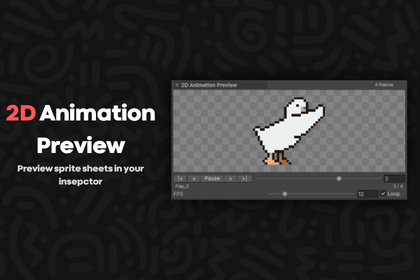
Check sliced sprite sheets where you import them
An inline playback preview for Unity's Texture Importer Inspector. It lets artists and developers check frame order, timing, and pivots without creating an Animation Clip or leaving the import workflow.
01 · The problem
After slicing a sprite sheet, I often need to see whether its sequence actually moves correctly. Creating an Animation Clip or switching windows adds work to a simple check of timing, order, and alignment.
I put that check directly below Unity's normal Texture Importer header, where the texture and its slicing settings are already visible.
Select the sheet, inspect the movement, and get back to the import workflow.
02 · My contribution
Added an expandable preview to Unity's existing Texture Importer Inspector without replacing the importer or duplicating its settings.
Implemented play and pause, frame stepping and scrubbing, looping, and adjustable playback from 1 to 60 FPS.
Used numeric-aware sprite-name ordering and pivot-aligned rendering to make sequence and alignment problems easier to spot.
03 · The design
The preview appears for one selected texture imported as Sprite (2D and UI) with Sprite Mode set to Multiple, after its slices are applied.
Playback and refresh logic stay in the editor assembly. The package adds no runtime dependency to a game's build.
The UI stays hidden for single sprites, non-sprite textures, and multi-selection. Tightly packed sprites cannot be previewed inline because Unity does not expose the needed source texture rectangles.
04 · Released package
Version 1.0.0 includes the editor tool, documentation, and a CC0 Goose sample with Idle, Walk, Run, and Flap sprite sheets. The public repository contains the customer package and an importable Unity package.
The preview works independently of the Built-in Render Pipeline, URP, and HDRP. Its documented minimum editor version is Unity 2022.3.40f1.